
With a redirect, visitors to a name in your domain are sent to another web address automatically. Typical cases:
- The domain without
wwwshould lead to the website withwww, for examplemusterfirma.attowww.musterfirma.at. Website builders that only work underwwwneed this in particular. - An old domain or an old name should point to the new website.
- A short address such as
aktion.musterfirma.atshould lead to a specific page.
You don't need a web server of your own for this. We issue the HTTPS certificate automatically on the first visit.
Where to find redirects
Open your Managed DNS service or your domain and select Redirects in the sidebar on the left.
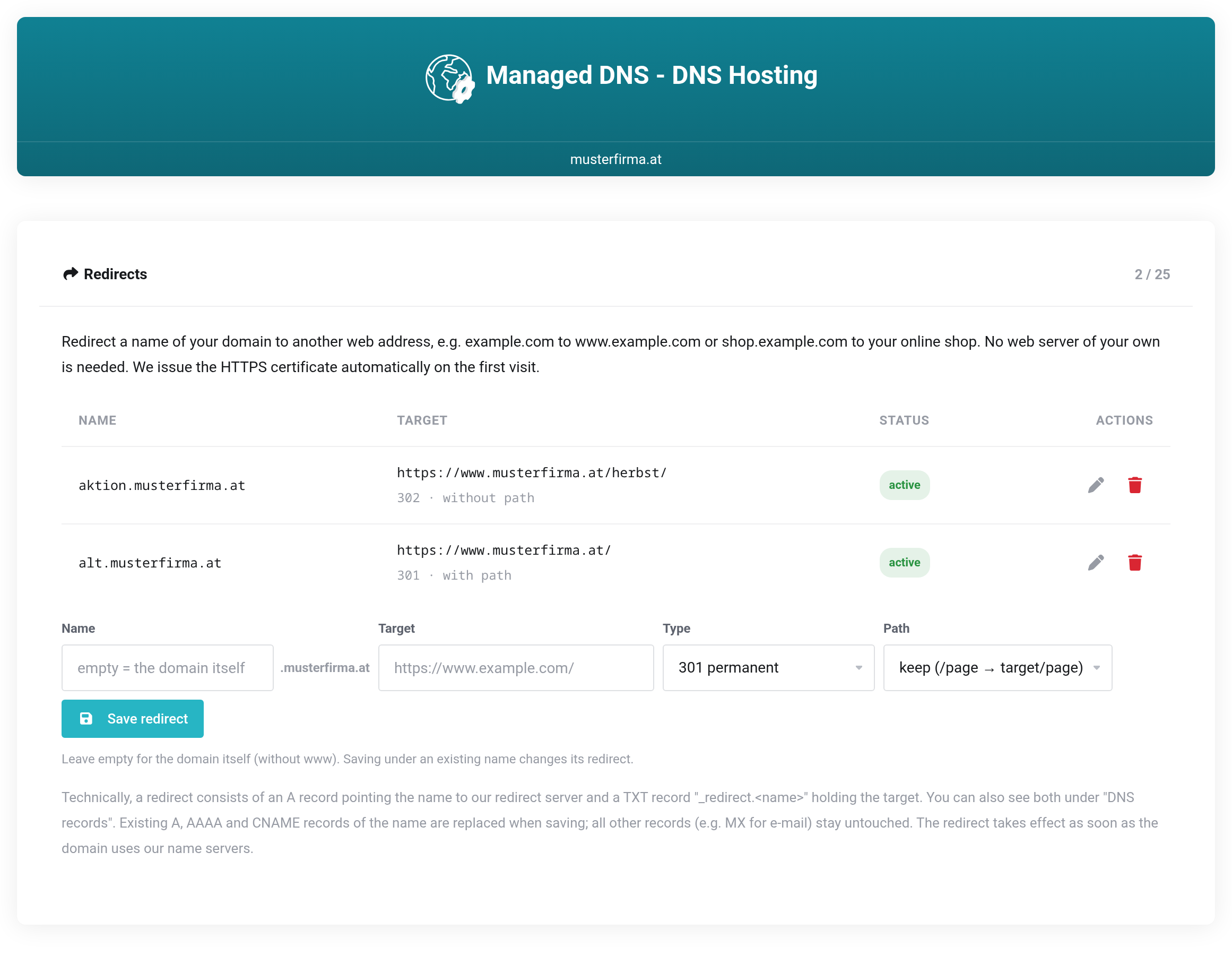
 Your redirects with target, type and status, and below them the form for a new one.
Creating a redirect
- Under Name, enter the name that should redirect, for example
aktion. The domain is appended automatically. For the domain itself (withoutwww), leave the field empty. - Under Target, enter the address visitors should reach, for example
https://www.musterfirma.at/herbst/. Ifhttps://is missing, it is added. - Choose the Type (see below). If in doubt, 301 permanent is right.
- Choose what happens with the Path (see below).
- Click Save redirect.
The redirect takes effect within a few minutes. The very first visit takes a moment longer because the certificate is issued then.
Which type?
| Type | When |
|---|---|
| 301 permanent | The usual choice when the redirect is meant to stay, for example from the domain without www or from an old domain. Search engines take over the new target. |
| 302 temporary | For campaigns and anything you want to change again later. Search engines keep the original address. |
| 308 permanent (forms) 307 temporary (forms) | Like 301 and 302, but the browser also passes submitted form data on to the target. Only needed if forms are sent to the old address. |
Keep the path or not?
- keep: A visitor to
alt.musterfirma.at/kontaktends up onwww.musterfirma.at/kontakt. This fits when the new website has the same pages, for example when moving from the domain withoutwww. - always to the target address: Every visitor ends up on exactly the address you entered, no matter which page they requested. This fits short addresses that lead to one specific page.
Status
active means: the name points to our redirect server and the redirect works.
not effective means: the A record of the name has been changed in the meantime, or there is an additional AAAA record. Visitors then end up somewhere else, entirely or in part. Save the redirect again (pencil, then Save redirect) to fix this.
What happens in your zone
A redirect consists of two records, which you can also see under DNS records:
- an A record pointing the name to our redirect server,
- a TXT record
_redirect.<name>holding the target, type and path.
When saving, existing A, AAAA and CNAME records of the name are replaced. All other records, such as MX for your e-mail, stay untouched. So a redirect only affects visits in the browser, never your e-mail.
Changing and deleting
The pencil loads a redirect into the form. Change the target, type or path and save. Saving under an existing name replaces its redirect.
The trash can deletes a redirect. The TXT record and the A record pointing to our redirect server are removed. The name is then no longer reachable on the web until you give it a new record under DNS records. We don't restore an earlier record.
Browsers remember a permanent redirect (301 or 308) for up to one hour. Visitors who have already used it may therefore see a change a little later.
Limits
- The target can only be a web address with
http://orhttps://, at most 200 characters long, without spaces, quotes or semicolons. - A name cannot redirect to itself.
- The redirect does not show the target page under the old address (no "masked" redirect); afterwards the address bar shows the target.
- Redirects are not possible for wildcard names (
*).


